
Virtualbox hiba Ubuntu 10.04 -n (WARNING: The vboxdrv kernel module is not loaded)
A dyra.eu megőrzött technikai archívumából
Na hála isten! Használni akartam a Virtualbox -ba telepített Win XP -t. És megkaptam a már múltkor is kapott hibaüzenetet. Csak épp az aktuális kernel kiírassál. Ez jó! Minden egyes kernel updatkor majd szarakodni kell a Virtual Box -al is. Örülök 
a hibaüzenet!
WARNING: The vboxdrv kernel module is not loaded. Either there is no module
available for the current kernel (2.6.31-21-generic-pae) or it failed to load. Please recompile the kernel module and install it by
sudo /etc/init.d/vboxdrv setup:
You will not be able to start VMs until this problem is fixed.
VBoxHeadless: Error -1908 in suplibOsInit!
VBoxHeadless: Kernel driver not installed
VBoxHeadless: Tip! Make sure the kernel module is loaded. It may also help to reinstall VirtualBox.
Most ráadásnak a múltkori parancs sem segít.
sudo /etc/init.d/vboxdrv setup
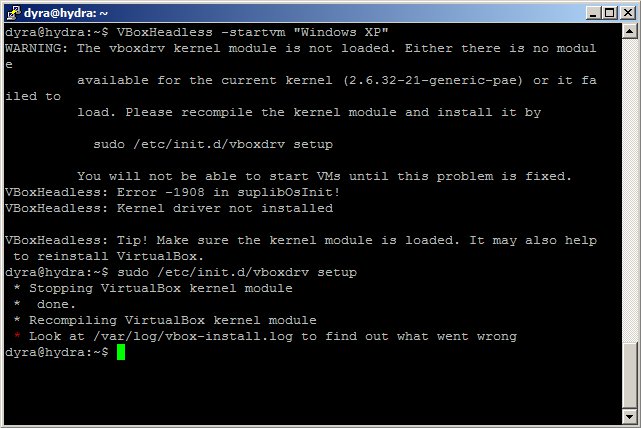
Azt mondja nézzem meg a vbox-install.log fájlt
Aminek a tartalma a következő.
Attempting to install using DKMS
removing old DKMS module vboxdrv version 3.0.14
------------------------------
Deleting module version: 3.0.14
completely from the DKMS tree.
------------------------------
Done.
Creating symlink /var/lib/dkms/vboxdrv/3.0.14/source ->
/usr/src/vboxdrv-3.0.14
DKMS: add Completed.
Error! Your kernel headers for kernel 2.6.32-21-generic-pae cannot be found at
/lib/modules/2.6.32-21-generic-pae/build or /lib/modules/2.6.32-21-generic-pae/source.
You can use the —kernelsourcedir option to tell DKMS where it’s located, or you could install the linux-headers-2.6.32-21-generic-pae package.
Failed to install using DKMS, attempting to install without
Makefile:147: *** Error: unable to find the sources of your current Linux kernel. Specify KERN_DIR= and run Make again. Stop.
Lényegében arról lenne szó, hogy ez a kernel nem tartalmazza a linux-headers-2.6.32-21-generic-pae csomagot. Emiatt nem képes a telepítő újra konfigurálni a Virtualbox -t. Ami csak azért jó mert ugye ha lekérem nekem mim van uname -r akkor ezt kapom vissza 2.6.32-21-generic-pae.
Szóval elvileg minden ok és mégse. Gondolom a VirtualBox még nem megy a 2.6.32-21-generic-pae kernelel. Én nem szarakodtam egyenlőre vissza tértem a 2.6.32-20-generic-pae kernelhez. Idővel szerintem a VirtualBox is kiad valami frissítést amivel fog menni. Addig marad ez a kernel.
ui: A megoldás ami egyébként tök logikus 
“Telepítsük a VirtualBoxot, a kernel fejléceit és a build-essential csomagot (ezek a VirtualBox kernel modul lefordításához kellenek), ezen kivűl a dkms csomagot, ami a frissítés miatt szükséges.”
sudo aptitude install linux-headers-$(uname -r) build-essential virtualbox-3.0 dkms
Ezek után természetesen gond nélkül működik a Virtualbox az új kernellel is 